
The initial hype wave of "let's slap a ChatGPT wrapper on our site" has crashed. Businesses realized that a generic chatbot that hallucinates facts about their products is a liability, not an asset.
In 2026, the goal isn't just Artificial Intelligence; it's Augmented Intelligence. We need systems that understand our specific business context, our private data, and our user history.
This is the story of how we moved beyond basic API calls and implemented full Retrieval-Augmented Generation (RAG) architecture directly within Laravel.
The Problem: LLMs Have Amnesia
Imagine hiring a brilliant consultant (ChatGPT-5), but they have absolutely no access to your company files. You ask them, "How do I reset my password on the portal?" They will give you a generic answer based on internet data, which is likely wrong for your specific system.
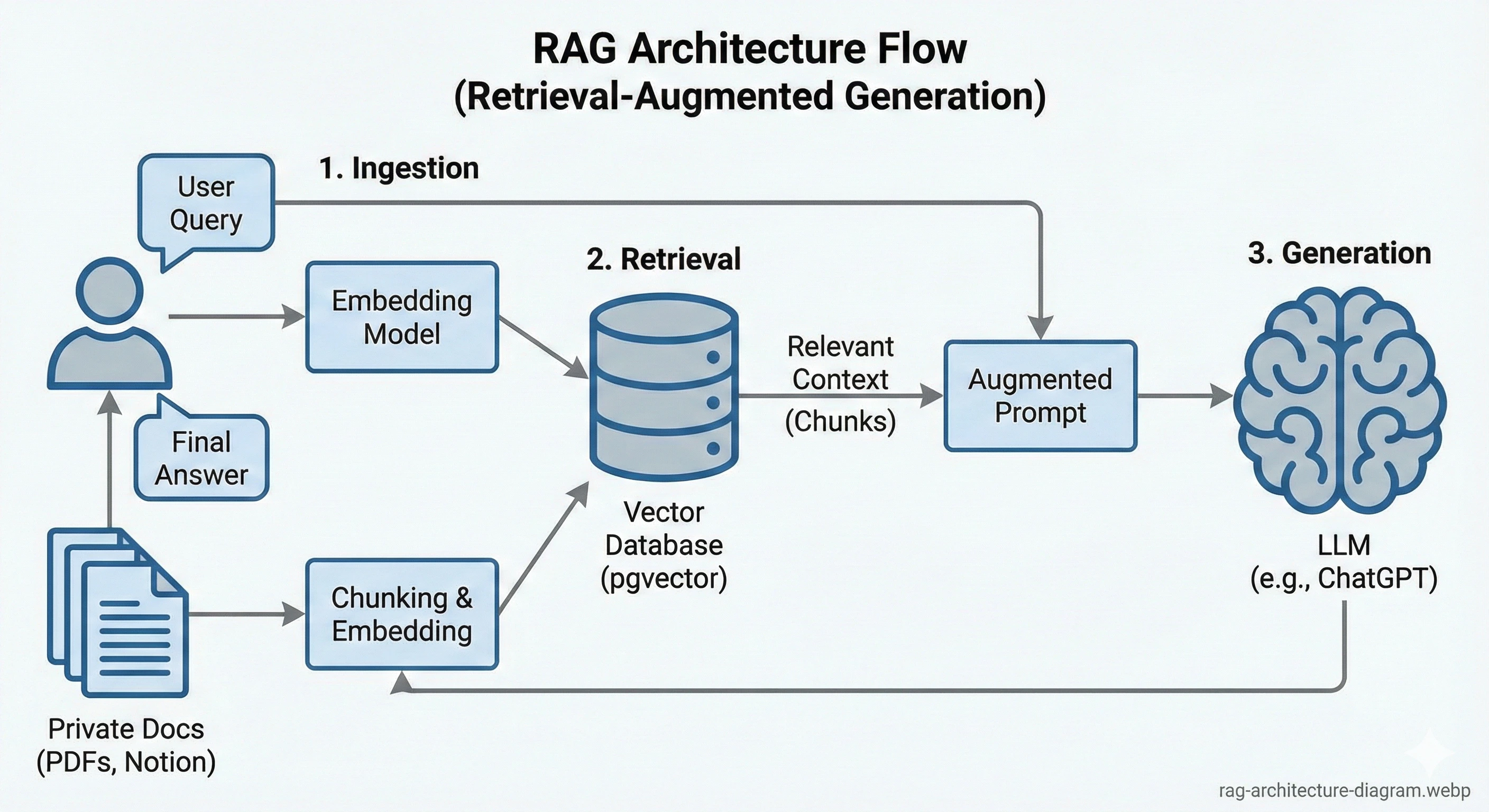
We needed a way to "paste" the relevant pages of our documentation into the AI's prompt before it answered.
Step 1: The Knowledge Base (Chunking & Embedding)
You cannot feed a 500-page PDF into an LLM prompt; it's too expensive and slow. You must break it down.
The Strategy
- Ingestion: We wrote Laravel commands to scrape our internal Notion docs and PDF guides.
- Chunking: We split text into logical segments (around 500 tokens each, allowing for overlapping context).
- Embedding: We sent each chunk to OpenAI's `text-embedding-3-small` model, which returned a vector (a list of 1,536 floating-point numbers representing the meaning of that chunk).
- Storage: We stored these in Postgres using `pgvector`.
Technical Insight: Why Postgres over Pinecone?
We initially used specialized vector DBs. But keeping our user data in Postgres and our vector data elsewhere created synchronization nightmares. Using `pgvector` means our embeddings live right next to our `users` and `documents` tables in reliable, ACID-compliant transactions.
Step 2: The Semantic Search
This is where the magic happens. Traditional keyword search fails here. If a user asks "How do I fix the blinky light issue?", standard search looks for the exact words "blinky light".
Vector (semantic) search understands that "blinky light" is semantically similar to "LED indicator flashing error code".
The Laravel Implementation
When a request comes in, we embed the user's question on the fly, then perform a cosine similarity search against our database. Laravel makes this incredibly elegant:
// Pseudo-code example of a Laravel controller
$questionEmbedding = OpenAI::embed($userQuery);

$relevantDocs = DocumentChunk::query()
    ->nearestNeighbors('embedding', $questionEmbedding, distance: 'cosine')
    ->take(5)
    ->get();

$context = $relevantDocs->pluck('content')->join("\n\n");

// Now, ask GPT with the context attached
$answer = OpenAI::chat()->create([
    'messages' => [
        ['role' => 'system', 'content' => 'Answer using only this context: ' . $context],
        ['role' => 'user', 'content' => $userQuery],
    ],
]);
Step 3: The Results and Business Impact
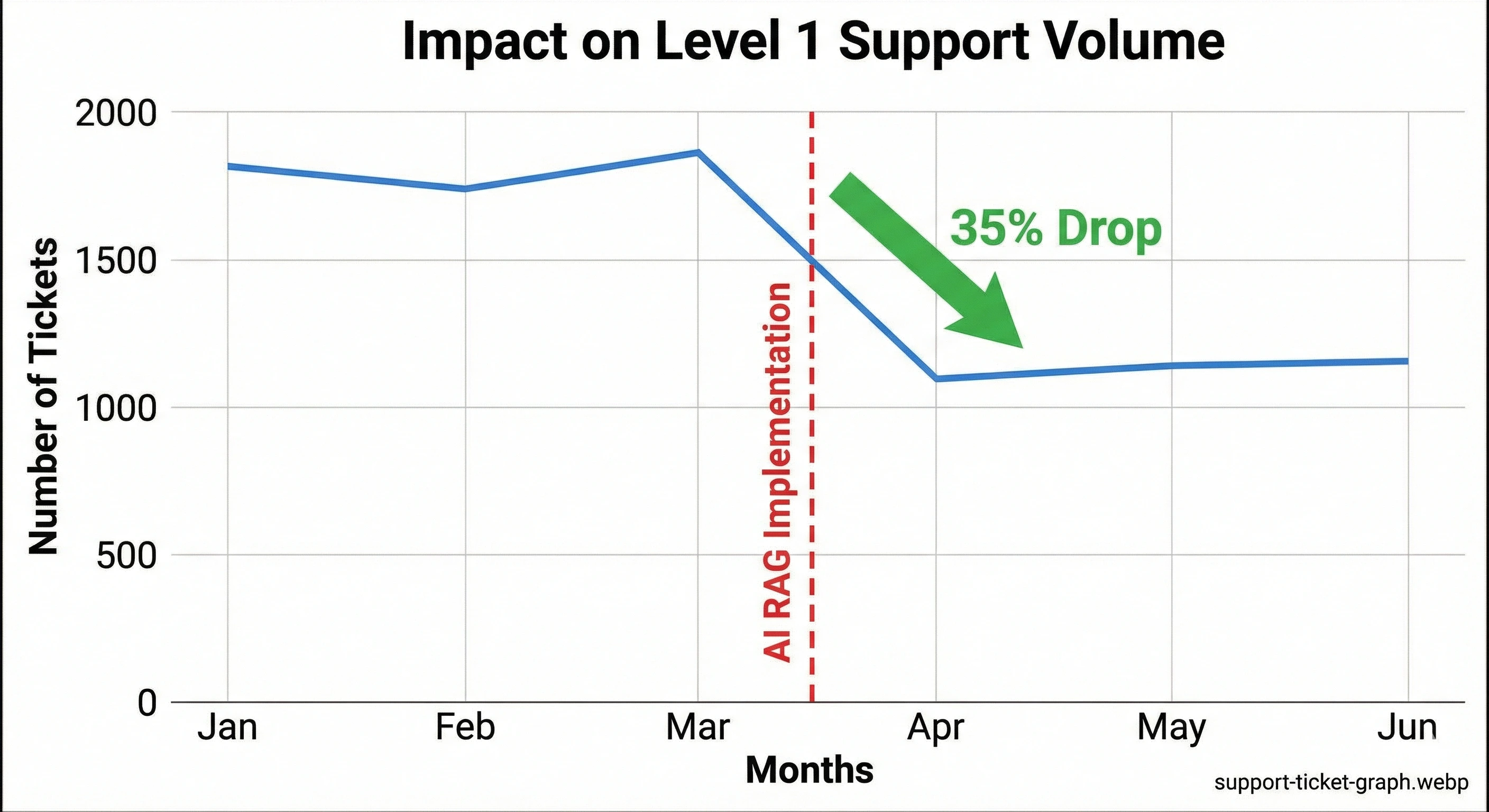
The difference was night and day. Our support ticket volume dropped by 35% within the first month because users were getting accurate answers from the documentation bot instantly.
Conclusion: PHP is Ready for AI
Don't let anyone tell you that you need Python for this. The orchestration layer—the part that connects the user, database, and AI APIs—is perfectly suited for Laravel. We are building sophisticated, multi-agent systems entirely in PHP, and the development experience is unmatched.